Full Feature Suite

Every Feature Your CA Practice Needs, In One Secure System

From phone-camera capture and OCR content search to multi-level partner approvals, digital signatures, scheduled client reminders and WhatsApp sharing, all included in one licence.

Unlimited Files per Upload
OCR Searchable Scans
7-Day Free Trial
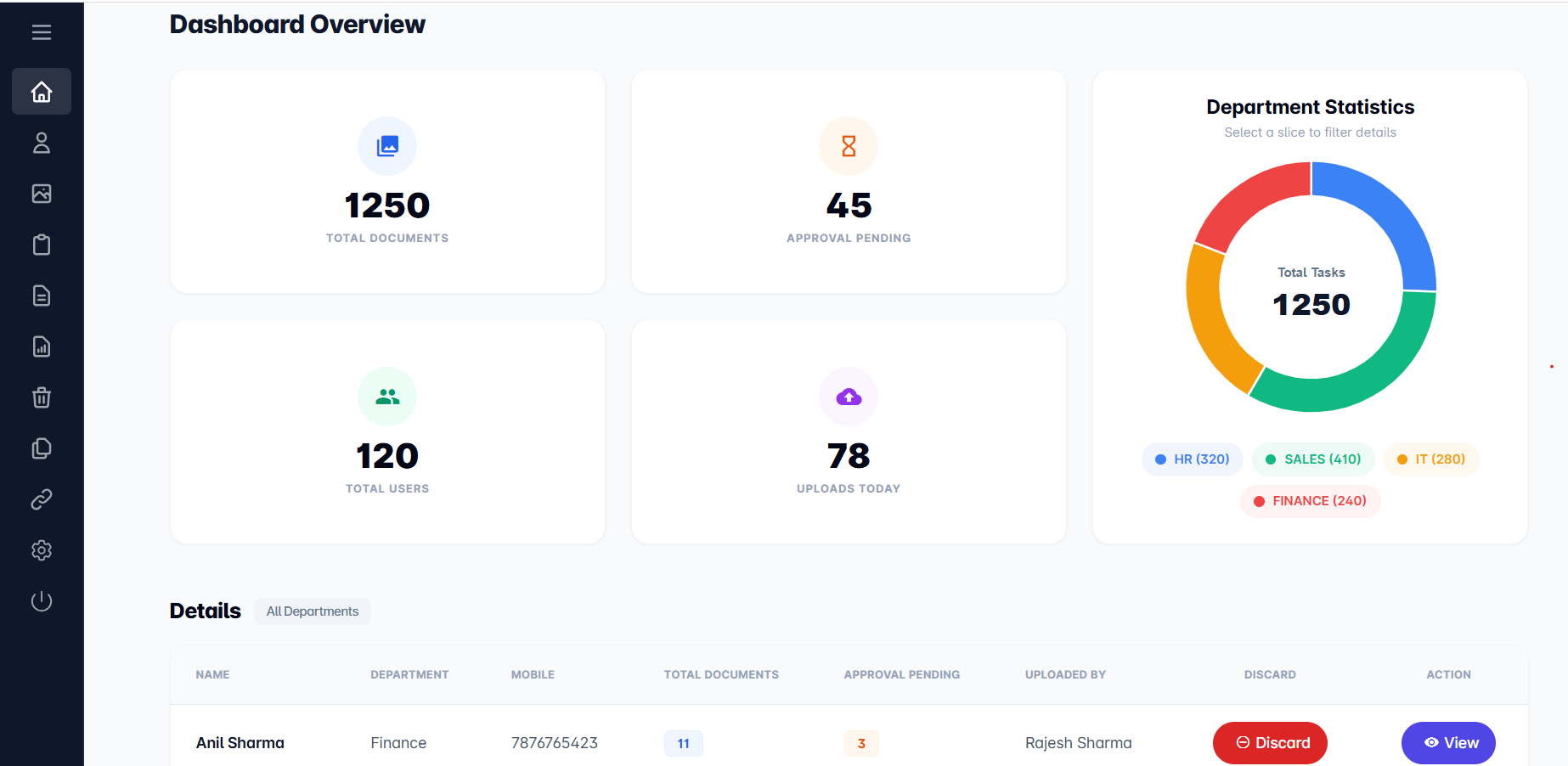
ShieldDoc DMS dashboard for CA firms

The Features CA Firms Use Every Day

The capabilities that replace physical files, email attachments and endless searching in a CA office.

Client-Wise

One Organised File for Every Client

Tag every document with the client's name, mobile number or unique ID, practice area and your own metadata such as PAN, FY or AY. Pull up a client's full history in seconds instead of searching shelves and shared drives.

  • Client name, mobile/UID and department tagging
  • Custom metadata for PAN, FY/AY, engagement
  • Department-wise views for every practice area
OCR Search

OCR Content Search and Auto Classification

ShieldDoc reads scanned and photographed documents so the words inside them become searchable, and sorts each document by type automatically. Find a client's papers by what they say, not just by file name.

  • OCR for scanned PDFs, images and TIFF
  • Search the text inside every document
  • Automatic document classification with manual override
Find Fast

Search by Client, Name, Metadata or Content

Find any file using the client's unique ID, the document name, metadata, or words inside the document. Filter by department and status to see exactly what is pending, completed or rejected.

  • Full-text content search across documents
  • Search by UID, document name and metadata
  • Filter by department and status
Approvals

Single and Multi-Level Review Workflows

Route work from article assistant to manager to partner. Configure single or multi-level approval per department, assign approvers in sequence, and record every approval or rejection with reasons and comments.

  • Single or multi-level approval per department
  • Reject with reason and reviewer comments
  • Assigned task queue for each team member
Sign-Off

Digital Signatures and Print-Ready Dockets

Partners can add a drawn or uploaded signature while reviewing a docket, then submit, print or save it as PDF. Each approver's signature and status are visible on the docket.

  • Draw or upload a signature
  • Approver signatures shown on the docket
  • Print and PDF output
Confidential

Private Documents and Controlled Access

Lock sensitive client documents as private, grant or revoke edit access per user by email, and check documents in and out so two people never overwrite each other's work.

  • Lock / unlock private documents
  • Grant or revoke document edit access
  • Check-in / check-out control
Reminders

Scheduled Client Reminders

Set daily, weekly or monthly email reminders on any document, with your own message and number of reminders, so follow-ups for pending client papers go out without anyone remembering to send them.

  • Daily, weekly or monthly frequency
  • Custom message and recipient list
  • Set the number of reminders
Share

Share by Email and WhatsApp

Send documents to clients and colleagues directly from ShieldDoc by email or WhatsApp, and download files when you need them offline.

  • Share on WhatsApp
  • Compose and send email from the app
  • One-click download

Capture & Intake

Bulk Upload

Upload as many documents as you need at once, up to 200 MB each: PDF, JPG, PNG, TIFF, Word, Excel, PowerPoint and text files, with progress tracking and editable file names.

Phone Camera Capture

Photograph client papers directly from a phone or laptop camera and upload them in the same step.

Mailbox Ingestion

Connect a mailbox to a department so documents your clients email in arrive in ShieldDoc, with an owner assigned.

Advanced Tagging

Tag every upload with client name, mobile/UID, department and free-form metadata for precise retrieval later.

OCR & Classification

OCR Content Search

Turn scanned documents and images into searchable text, with Basic, Premium and Enterprise OCR levels.

Document Definitions

Define the document types each department handles, such as Form 16, GST returns or audit reports.

Auto Classification

Pages are classified by document type automatically; reviewers can correct the class page by page.

Manual Entry Queue

Documents that can't be read automatically are moved to a manual queue with an inline preview, so none are missed.

Organise & Find

Content & Metadata Search

Search by unique ID, document name, metadata or text inside the document, with department and status filters.

Live Dashboard

Department-wise chart of documents, totals, pending approvals, today's uploads and per-user upload statistics.

Recycle Bin

Discarded documents can be restored from the recycle bin and are permanently removed after 30 days.

Track Document

A timeline of every activity on a document, from upload through review, approval and sharing.

Review, Approve & Sign

Multi-Level Approvals

Single or multi-level approvals per department with an ordered approver list.

Task Assignment

Each reviewer gets a task queue; pick up the next task with one click and see what's assigned to you.

Digital Signature

Draw or upload a signature (PNG/JPEG) and apply it when approving a docket.

Verification Workspace

Review each document beside its page image with zoom, rotate and page navigation; edit, submit, reject or print.

Collaborate & Control

Online Editor & Revisions

Edit documents online or upload a new revision; every version is kept in document history.

Check-In / Check-Out

Lock a document while you work on it and release it when done.

Manage Access

Grant or revoke document edit access for specific users by email.

Private Documents

Mark confidential documents as private; private documents are also kept out of reports.

Share & Notify

WhatsApp Sharing

Share documents on WhatsApp straight from the document list.

Email from the App

Compose and send documents by email, using your own SMTP sender for branded mail.

Scheduled Reminders

Daily, weekly or monthly email reminders on a document with custom message and reminder count.

Scheduled Reports

Reports are generated every evening and can be downloaded for daily, weekly or monthly periods.

Administration & Integration

User Management

Create users, assign sub-admins and manage status for your partners, managers and staff.

Your Firm's Branding

Upload your firm's logo for the header, sidebar and loading screen.

APIs, Bots & Webhooks

Built-in API catalogue, bot access keys for system integration, and callback URLs with custom headers.

Email & Mailbox Settings

Configure SMTP sending and per-department mailbox ingestion from the settings screen.

Stop Chasing Client Papers. Run Your Practice on ShieldDoc.

Give every client a secure, searchable digital file, with OCR search, partner approvals and reminders included, for ₹9,999 per year.

₹9,999 per year · Unlimited users & storage · 1 year unlimited support · 7-day free trial